Posts

Throwback Design

So right now the design trends are very simplistic, lots of white space, big buttons, flat colors. Think minimalist. Think flat. Does this remind anyone else of the 90s? I am sure I've been at this too long, and I guess my age is now showing. Everything often comes full circle, and design (in any form) is no exception... look at fashion design, it's like someone went through my elementary school clothing and tried to make it seem new again. Of course there are new things thrown in there. Infinite scrolling is really hitting the main stream, as is parallax scrolling (I TOTALLY was designing a website for my singer friend years ago with this concept in mind... I never did finish the site tho - I should really go back and look at that some day. Maybe I was a bit ahead of the game there... of course it was built in Flex, a dying technology.) Why these trends? Why this movement? In a word, mobile. I don't think it's any secret or any great epiphany that mobile is ste...

InDesign default units

I always found it annoying that when first creating a document InDesign it defaults the size in Picas. Call me unworthy, but I don't work in Picas, I work in Inches (yes I am Canadian, whatever metric system). So every time I would create a document I would go to Edit - Preferences - Units & Increments and change the Horizontal and Vertical Ruler Units to Inches. One day it occurred to me, shouldn't there be a way to set this once and have it the default so that I don't have to do this EVERY DAMN TIME? (Why it took me so long to think of this, I don't know. Don't judge.) After just clicking around InDesign for a couple minutes I found no immediate way to do this, so I turned to my old friend Google. At the end of this article ( http://indesignsecrets.com/changing-indesigns-default-ruler-measurements.php ) I discovered that there is a very simple way to do this, it`s just not all that intuitive. Open up InDesign but do NOT open or create ...

Illustrator Align to Artboard

Image
Don't ask me why, but me and the Illustrator Artboard have never truly gotten along. I had a logo file that I wanted to export as a JPG on a perfectly square background so that it looked good on the client's Twitter and Facebook page. I knew how to get the artboard to be a square but I did not know how to center the logo on the artboard. A little research with Google found me the answer. ( http://kcoppock.wordpress.com/2007/03/18/adobe-illustrator-align-to-artboard/ ) First to get the artboard square; File - Document Setup..., hit the "Edit Artboards" button. In the options just under the file menu there is W and H (width and height), choose the same number for both, hit Enter, voila! Next, getting the logo centered on the artboard. First I grouped all the objects in the logo (select all objects, right click, group). Then I opened the Align panel (Window - Align). On the Align panel I clicked the "Align To" arrow in the bottom right ...

Where have you been?

Where have I been you ask? Well I went and had a baby, aka time sucker/love of my life. I haven't been working much with code, so I have less to post about. I've been doing a lot of visual design and IA work lately and it's great! Hope to start posting more often!
Great example on creating and positioning TitleWindows. http://www.mxml.it/index.php/2008/06/18/positioning-popups/

Paper Prototyping

I've been pretty far down in the trenches the last couple months, hence my lack of posting. It's good to be busy, and working on what I love the most, visual designs. A fun thing happened while on the client site last week, and I thought I'd quickly post about it. I was there to present my visual designs and get feedback before the requirements doc was finalized. I had suggested to the client previously, with the recommendation of my company's UX Director, that I try some paper prototyping with some real users. They liked the idea, but didn't really speak of it much since. So there I was, on the client site, working away at some suggested changes made by the BAs in our morning session, and here comes a BA with a user. "Do you want to try some paper prototyping?" I was a little stunned, but luckily had my visuals previously printed (all be it in black and white). I took the user into a meeting room. Now this isn't something I had ever done before, I rea...

Default Flex DateChooser to tomorrow

I have a DateChooser control and I was trying to default it to have tomorrow's date selected. This is actually really easy to do, but it took me a fair amount of time to figure it out, so I thought I'd post this just in case anyone else has some trouble. Create a variable for today's date: [Bindable] private var today:Date = new Date(); Then set the selected date of the DateChooser. You may also want to set showToday to false so that today's date isn't highlighted. <mx:DateChooser selectedDate="{new Date(today.fullYear,today.month,today.date+1)}" showToday="false"/> The selectedDate property only understands straight dates with no time, which is why I had to assign it this way. If you're at the end of the month/year Flex is smart enough to know that date + 1 should take you to the next month/year. Here is a sample with view source enabled.

Word wrap in AdvancedDataGrid

So getting a column field to wrap in an AdvancedDataGrid isn't as easy as just setting the "wordWrap" property to true. Maybe it should be, but it isn't. First thing's first. Do you have an itemRenderer on the column you're trying to wrap. If the answer is yes you have to make sure that itemRenderer is based on a wrappable component. For argument's sake, lets say you have a Label itemRenderer, well you're going to have to change that to be based on Text, and you're going to have to give it a width to give it the capability to wrap (percentWidth = 100 works nicely). Then set your wrap-able column to wordWrap = true . Finally set your AdvancedDataGrid to have property variableRowHeight = true . Here is a link to an example with the view source enabled.

My first experience doing contextual research

For some back story – I’ve been on this project for 2 years now. I’ve helped design and build two dashboards and have never had the opportunity to meet or talk with a user until now and I am no expert in the client's line of business. I met with 7 users from 3 different user groups; 1 group per day; 30-45 minutes with each user, followed by an hour group session discussing the observations. A lot of them have similar issues. Issues within groups of users seem to be pretty much the same. I found myself getting frustrated and having to consciously calm myself down while meeting with the users. Seeing the roundabout way some of them had to work just to use the system drove me crazy. If I had only been involved from the beginning in this capacity, and with the requirements gathering for each release, these poor users wouldn't have to deal with a system that really doesn't meet their needs. But hey, better late than never I suppose. That is the story of my life... the story of ...

Spark Icon button

So the Spark button doesn't have the icon property... which to be honest annoys me a little, but I do understand that they want the skin to be separate from the code. Anyway, I made an icon button based on some other examples I've looked over. To see the working example with view source enabled click here .

Spark ComboBox vs DropDownList

I discovered yesterday that with the new Spark components there was no "editable" property on the ComboBox component. I realized that the Spark ComboBox is always editable by default, and with no way to turn that off I was confused. Did a little research and found that to have what would have been ComboBox editable="false" in Halo is now simply DropDownList. Two different components. I think it makes sense to have these separate.

Spark image button

So skinning spark buttons with images isn't the same as skinning halo (mx) buttons with images. It's a 3 part process. components.ImageButton.as package components { import spark.components.Button; [Style(name="imageSkin",type="*")] [Style(name="imageSkinDisabled",type="*")] [Style(name="imageSkinDown",type="*")] [Style(name="imageSkinOver",type="*")] public class ImageButton extends Button { public function ImageButton() { super(); } } } Script block [Embed('assets/images/btnGoUp.png')] [Bindable] public var btnGo:Class; [Embed('assets/images/btnGoOver.png')] [Bindable] public var btnGoOver:Class; [Embed('assets/images/btnGoDisabled.png')] [Bindable] public var btnGoDisabled:Class; MXML block <components:ImageButton buttonMode="true" imageSkin="{btnGo}" imageSkinDisabled="{btnGoDisabled}" imageSkinDown="{btnG...

What is a UX specialist?

A UX specialist is the best thing your company never knew it needed. Remember the day you got your first microwave? Your first cell phone? Your first smart phone? Your first DVR? Remember life before these devices? Can you imagine going back to that? What these devices do for your life, is what a UX specialist can do for your development company. A UX specialist can make things run more smoothly. A UX specialist will always make a product better, and will make a client happier. They may need some time up front, kind of like how you need to spend time learning and setting up your smart phone when you first get it, but more often than not, the total time spent on the project will be less because all those bumps and kinks get sorted out right up front. Because of this, a UX specialist will make your other team members happier because their job will be easier and there will be less rework. If you're running your TV without a DVR, you're missing out. If your development company is o...

iPhone & iPad design PS goodies

Image
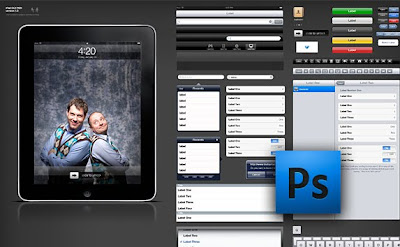
I have to very quickly come up with a design for an existing application for the iPad and the iPhone. No real time to learn some cool new tools (unfortunately). I am most comfortable in Photoshop so that's what I went hunting for for tools... These are just awesome and so helpful... iPhone: http://www.teehanlax.com/blog/2009/06/18/iphone-gui-psd-30/ iPad: http://www.teehanlax.com/blog/2010/02/01/ipad-gui-psd/

Flex 3 & Flex 4 Frankenstein

So we have a large dashboard application built in Flex 3.5 SDK. Anyway, making it work with the Flex 4 SDK was annoying and took nearly a week. So the client doesn't want to give me the time to rewrite the UI in the new spark stuff BUT instead slowly convert it over time. So I started to try that... doesn't seem possible. Spark components don't work with the "Use Flex 3 compatibility mode" box checked. When I uncheck that box my whole project blows up and looks totally messed up. So my ultimate conclusion is that a Flex 3 Flex 4 Frankenstein is not really possible.

Flex 4 SDK - backwards compatible?

So for the last few weeks I have been trying to get our current Flex 3.5 SDK to the new Flex 4 SDK. Wow. Backwards compatible? Not really. After much annoyance and code changes, I finally got it working and running without run time errors. Now there are lots of things wrong visually mostly with the fonts. What I am discovering is that the CSS inheritance seems to be lost. For example, if I have a VBox that has its color style set to white, its children are not white. Not sure what is up with that. So in my Application style tag I had the font family set... but it's not picking up on all the components inside the application, which means there are lots of problems with labels being too large and not fitting properly. So now I am messing with the CSS files and the component files. So far my take on the backwards compatibility? It's barely there. I mean everything functions okay (once you get all the initial errors and warnings cleaned up) but there is going to be a lot of work vi...

Looking for a website?

I'm looking for some freelance work if anyone knows of someone needing a website. I'm done my latest side project and usually like to have one on the go at a time. You can see samples of my work here: angelaportfolio.com

East Coast German Shepherd Rescue

Image
Yesterday I put up the newly redesigned and rebuilt East Coast German Shepherd Rescue website. We adopted our German Shepherd, Keely, from this rescue. Since then I have chatted off and on with the founder of the rescue, and have gained the up-most respect for her and what she does. I wanted to help, but wasn't sure how. One day she mentioned how difficult it has been to get updates to her website, and new dogs that come into her care can't get adopted if no one knows about them. And so I began a mission to design a better website. How it is currently is only the first round. I need to learn more about PHP and different content management systems. The ultimate goal is to enable her the ability to update the website easily herself. I also have several ideas to make the site better, more interesting, and to get more funding. Here's a link to the site (iteration 1) http://www.ecgsrescue.com

Learning Flex 4

I am watching a few videos on Flash Builder 4 (or Flex 4) from Adobe's site. http://www.adobe.com/devnet/flex/videotraining/ This is my first taste of the Spark components, and let me tell you, they are so much better and easier to customize. They haven't transfered all the components over to spark yet, so we'll still have to use some MX components, but they have done a lot of them already, and are continuing to work to get them all converted. I haven't tried to actually do any real work with this yet, but so far it has my vote.

VSS plugin for Flash Builder 4

So the new "Flex Builder", now called Flash Builder, is out. I have recently installed it... all was fine until I tried to use the VSS plugin. It wasn't being recgonized. Now I know you need the Java Development Tools plugin for it to work... but I couldn't find that either. They really changed the whole install new features thing in Flash Builder 4. So I hunted on Google for a while and found my solution, install it manually: http://renaun.com/blog/2010/03/31/416/ Thanks Renaun!!